
The bnns package provides tools to fit Bayesian Neural Networks (BNNs) for regression and classification problems. It is designed to be flexible, supporting various network architectures, activation functions, and output types, making it suitable for both simple and complex data analysis tasks.
Features
- Support for multi-layer neural networks with customizable architecture.
- Choice of activation functions (e.g., sigmoid, ReLU, tanh) and output types for regression (continuous) and classification (binary and multiclass).
- Choice of prior distributions for weights, biases and sigma (for regression).
- Seamless integration with the
tidymodelsecosystem (parsnip,recipes,workflows,tune). - GPU acceleration support via OpenCL for significantly faster model training (requires
cmdstanrto be installed separately). - Built-in functions for model evaluation (
loo.bnns(),waic.bnns()), plotting (plot.bnns()), and saving/loading (save_bnns(),load_bnns()). - Bayesian inference, providing rigorous uncertainty quantification via posterior distributions for predictions and parameters.
- Applications in domains such as clinical trials, predictive modeling, and more.
Why bnns instead of brms?
While brms is an exceptionally powerful tool for general Bayesian regression and mixed-effects models, bnns is purpose-built specifically for Bayesian Neural Networks (BNNs). Here is why you might choose bnns for these specific tasks:
-
Simplified Architecture Setup:
bnnsallows you to define complex, multi-layer neural networks intuitively using straightforward arguments (Lfor number of layers,nodesfor nodes per layer,act_fnfor activation functions). Implementing a multi-layer feed-forward neural network inbrmsrequires writing extremely complex, custom non-linear formulas. -
Native
tidymodelsIntegration:bnnsprovides first-class support for thetidymodelsecosystem (parsnip,recipes,tune,workflows). This makes it seamless to incorporate Bayesian Neural Networks into standard R machine learning pipelines, cross-validation, and hyperparameter tuning workflows. -
Purpose-Built Stan Code: The underlying Stan code generated by
bnnsis tailored explicitly for neural network matrix multiplications and feed-forward passes, keeping model compilation and execution efficient for deep learning structures. -
Out-of-the-Box Classification: Easily handle continuous regression, binary classification, and multi-class classification natively with built-in output activation functions (
out_act_fn).
Installation (stable CRAN version)
To install the bnns package from CRAN, use the following:
install.packages("bnns")Installation (development version)
To install the bnns package from GitHub, use the following:
# Install devtools if not already installed
if (!requireNamespace("devtools", quietly = TRUE)) {
  install.packages("devtools")
}

# Install bnns
devtools::install_github("swarnendu-stat/bnns")
Getting Started
1. Iris Data
We use the iris data for regression:
head(iris)
#>   Sepal.Length Sepal.Width Petal.Length Petal.Width Species
#> 1          5.1         3.5          1.4         0.2  setosa
#> 2          4.9         3.0          1.4         0.2  setosa
#> 3          4.7         3.2          1.3         0.2  setosa
#> 4          4.6         3.1          1.5         0.2  setosa
#> 5          5.0         3.6          1.4         0.2  setosa
#> 6 5.4 3.9 1.7 0.4 setosa3. Model Summary
Summarize the fitted model:
summary(iris_bnn)
#> Call:
#> bnns.default(formula = Sepal.Length ~ -1 + ., data = iris, L = 1,
#>     nodes = 4, act_fn = "softplus", out_act_fn = "linear", chains = 1)
#>
#> Data Summary:
#> Number of observations: 150
#> Number of features: 6
#>
#> Network Architecture:
#> Number of hidden layers: 1
#> Nodes per layer: 4
#> Activation functions: 3
#> Output activation function: 1
#>
#> Posterior Summary (Key Parameters):
#>                mean      se_mean         sd        2.5%         25%        50%
#> w_out[1] -0.5942278 0.2183999192 0.79456857 -1.86701355 -1.09251619 -0.8169628
#> w_out[2]  0.8336814 0.1038869956 0.73827166 -0.51846423  0.33211823  0.7957336
#> w_out[3]  0.4338102 0.2921135070 0.86147575 -1.36143601  0.04394916  0.5954254
#> w_out[4]  0.6850131 0.1360689685 0.76972857 -1.04704293  0.29744188  0.7507712
#> b_out[1]  2.2618133 0.0769776211 1.17876734 -0.02391873  1.42283776  2.2881991
#> sigma     0.3020955 0.0005477896 0.01953213  0.26715455  0.28850768  0.3012247
#>                  75%     97.5%       n_eff      Rhat
#> w_out[1] -0.01503725 1.2874762   13.236032 1.0106679
#> w_out[2]  1.24910581 2.3385023   50.502168 0.9987815
#> w_out[3]  1.00906365 1.8752488    8.697268 1.1745061
#> w_out[4]  1.21289586 1.9468606   32.000519 1.0439056
#> b_out[1]  3.13716320 4.3023801  234.491563 1.0087978
#> sigma     0.31349020 0.3406216 1271.368723 0.9999925
#>
#> Model Fit Information:
#> Iterations: 1000
#> Warmup: 200
#> Thinning: 1
#> Chains: 1
#>
#> Predictive Performance:
#> RMSE (training): 0.2820529
#> MAE (training): 0.2234438
#>
#> Notes:
#> Check convergence diagnostics for parameters with high R-hat values.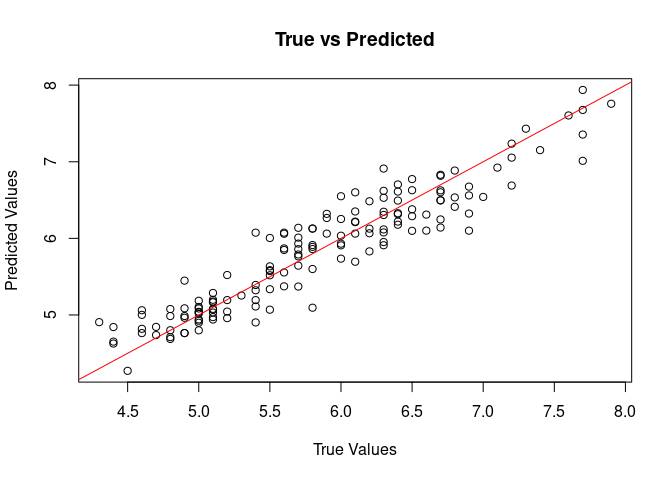
Applications
Regression Example (with custom priors)
Use bnns for regression analysis to model continuous outcomes, such as predicting patient biomarkers in clinical trials.
model <- bnns(Sepal.Length ~ -1 + .,
  data = iris, L = 1, act_fn = "softplus", nodes = 4,
  out_act_fn = "linear", chains = 1,
  prior_weights = list(dist = "uniform", params = list(alpha = -1, beta = 1)),
  prior_bias = list(dist = "cauchy", params = list(mu = 0, sigma = 2.5)),
  prior_sigma = list(dist = "inv_gamma", params = list(alpha = 1, beta = 1))
)
Classification Example
For binary or multiclass classification, set the out_act_fn to 2 (binary) or 3 (multiclass). For example:
# Simulate binary classification data
df <- data.frame(
  x1 = runif(10), x2 = runif(10),
  y = sample(0:1, 10, replace = TRUE)
)

# Fit a binary classification BNN
model <- bnns(y ~ -1 + x1 + x2,
  data = df, L = 2, nodes = c(16, 8),
  act_fn = c("softplus", "sigmoid"), out_act_fn = "sigmoid", iter = 1e2,
  warmup = 5e1, chains = 1
)Documentation
- Detailed vignettes are available to guide through various applications of the package.
- See
help(bnns)for more information about thebnnsfunction and its arguments.
Contributing
Contributions are welcome! Please raise issues or submit pull requests on GitHub.